Spelling & IP Checks for Print Artwork
Scope
Purpose: Spelling & IP Checks for Print Artwork removes spelling errors and trademark conflicts from print artwork before it reaches bulk. The designer checks the text and the Intellectual Property (IP) position, and the DM approves the artwork before it converts into an order. Merchandising and Quality Control (QC) repeat the check at strike-off and at inspection.
Owner: DM.
Applies to: Designers, DM, the Merchandising team, and QC. The process covers every print artwork from the Spring Near East design team, the factories, the customers, and external artwork suppliers.
Process
-
Designer — Spell-check the artwork. Run the Adobe spelling tool and a reputable grammar and spelling website over every element of the design.
- Check each text element separately. A slogan, a back neck print, and a label all carry the same risk.
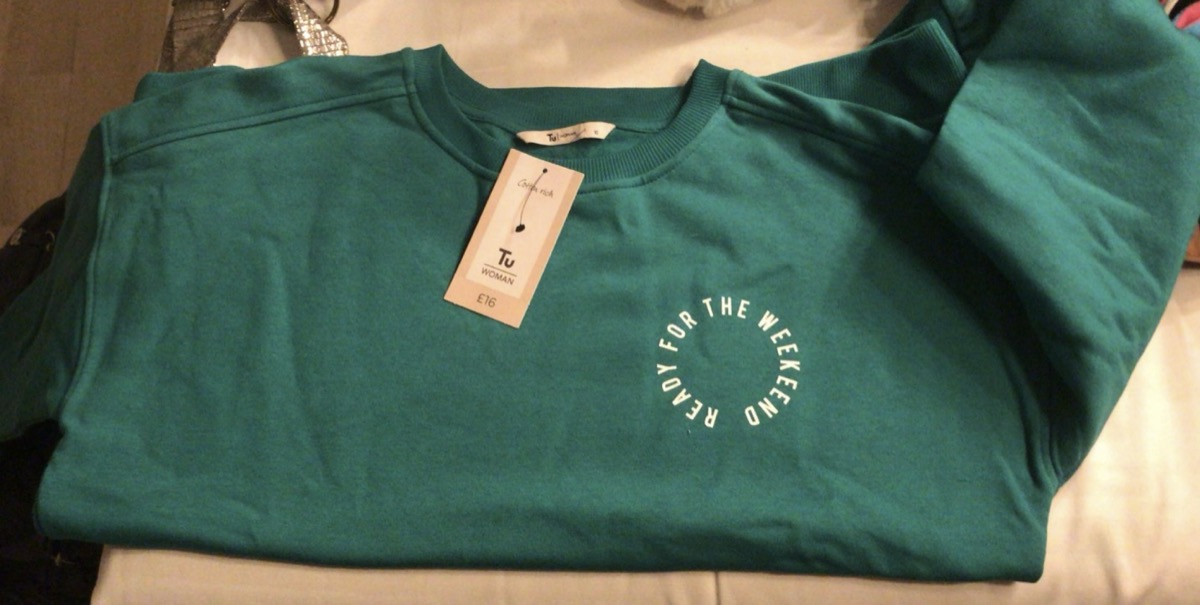
- One missed letter reached bulk in January 2022: 15,000 Sainsbury's sweatshirts shipped reading "READY FOR THE WEEKEEND". SpringNE sent 7,500 units in store to charity bins at a direct loss of £50,000, and reworked the other 7,500 units in Turkey with new chest prints for a further £8,000 to £10,000.
-
Designer — Verify the special elements. Check every foreign word, event date, place name, and unique reference against its source.
- Verify these details individually. A spelling tool passes a correctly spelled word that names the wrong city or the wrong year.
-
Designer — Run the IP check. Confirm on the UK Intellectual Property Office website that the slogan and the design elements carry no trademark or copyright conflict.
- Check the slogan text and the graphic elements separately.
- Where the search returns a conflict, stop the artwork and refer it to the DM.
-
Designer — Tick the spell check box. Tick the spell check box on the design spec only after steps 1 to 3 finish.
- The ticked box is the designer declaration that the text and the IP position both passed.
-
MR — Verify the spec before production. Check that the spell check box carries a tick on every spec.
- Return an unticked spec to the designer and hold the file until the tick arrives.
-
DM — Approve the artwork for production. Review the artwork and confirm the approval once the graphic converts into an order.
-
DM — Approve factory and customer artwork. Apply the same review to any artwork the factory or the customer supplies.
- MR checks the spelling once the customer or factory confirms the artwork, and checks it again at strike-off approval.
-
QC — Verify the artwork at inspection. Check the artwork and the spelling on the garment during inspection, so a print error cannot pass into shipment.
Workflow
Tutorial
This training video supports the Spelling & IP Checks for Print Artwork process. It does not replace the numbered steps.
Admins will add a Microsoft Stream or SharePoint watch URL when the tutorial for Spelling & IP Checks for Print Artwork is ready.
Exam
| Pass mark | Expected duration | Attempts |
|---|---|---|
| 80% | Admin will provide this soon | Admin will provide this soon |
The exam is not published yet. Admins will add it here when the assessment is ready.
Changelog
Changelog
| Date | Changed by | What changed |
|---|---|---|
| 2026-09-21 | Design Team | Article Added from SOP 3.2 Spelling & IP Checks for Print Artwork. |